Welcome to the QM Data Management Documentation
These documentation pages describe how to use our data management framework to store scientific datasets in a secure, organized, and simple way.
The software consists of two applications:
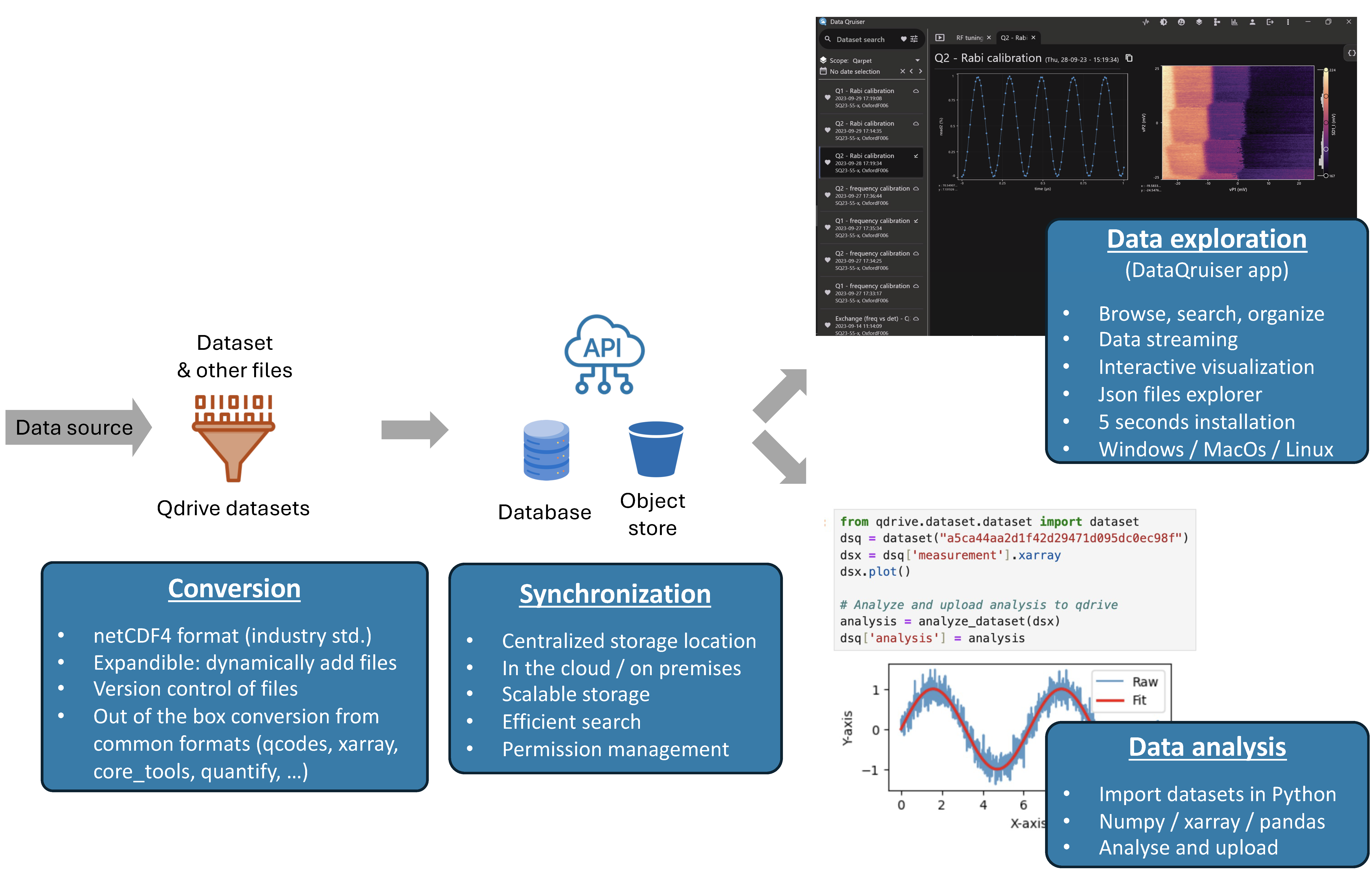
- DataQruiser is an application that allows you to visualize, search, browse, and organize your data.
- qDrive is a Python package that allows researchers to programmatically search, import, analyze and upload data.
The software is designed to integrate with our QUAlibrate package, but it can also synchronize data from various other sources like QCoDeS, Labber, Quantify, and core_tools, and makes it easy to build tooling to import data from custom formats.
Our objectives are:
- Data security & persistency: The centralized storage location (cloud/on-premises) ensures that all data are properly secured and backed up.
- Scalable and organized storage: Metadata are stored in a PostgreSQL database and files in an object store, ensuring high performance and unlimited storage. Datasets are organized in different scopes, each scope allows managing access permissions for different users. Each dataset can be labeled with attributes which can later be used for filtering and searching.
- Accessibility: The qDrive Python library allows synchronizing local datasets to the centralized storage and retrieving them for analysis in Python. The dataQruiser app allows you to visualize, search, browse, and organize your data. All plots are interactive and support streaming.
The server and storage can be hosted on-premises or in the cloud.
Getting Started
Below you find the latest documentation on our software packages. To install and set up the software, please follow the instructions below:
- DataQruiser installation — download and install the desktop application
- qDrive installation — install the Python package and authenticate
- Release notes — DataQruiser version history
Need Help?
If you encounter any issues, have questions, or have ideas to suggest, don't hesitate to get in touch with us through our github page.
Thank you for choosing qDrive. Let's embark on a seamless and productive measurement journey together!